Sprunt: A Vibrant Color Font for Bold Design Projects
Finding a typeface that truly captures energy and personality can be a challenge. Many fonts feel safe or generic, failing to make a lasting impression. Sprunt breaks that mold. It’s a vibrant color font, built on the modern OpenType-SVG format, designed to inject a playful, standout quality into any creative work. This isn't just another typeface; it's a design asset with built-in visual impact.
The Visual Character of Sprunt
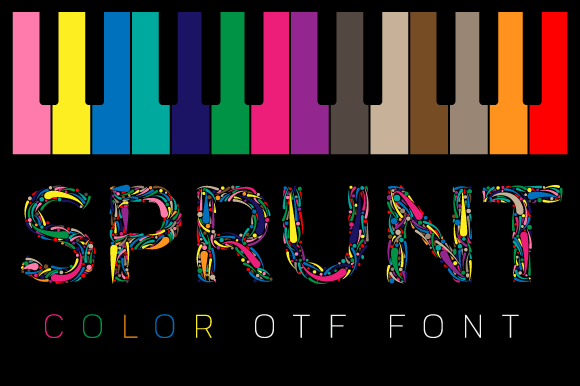
Sprunt immediately communicates a sense of fun and creativity. Its letterforms are crafted with a playful edge, featuring soft curves and a slightly informal structure that feels approachable yet confident. The defining feature is its color capability. Unlike traditional single-color fonts, Sprunt arrives with multi-color gradients and textures embedded directly into the glyph data. When you type, the letters appear with pre-set color combinations, offering a rich, textured look straight out of the box.
This style sits comfortably between a display font and a handwritten font, but with a distinctly modern twist. It avoids the overly casual feel of a pure script while retaining a human, crafted quality. The overall appeal is one of joyful expression, making it ideal for projects where you want to evoke excitement, creativity, or a friendly, approachable brand identity.
Where Sprunt Truly Shines
Understanding a font's strengths helps you apply it effectively. Sprunt’s vibrant personality makes it a natural fit for specific applications where grabbing attention is key.
- Branding & Logo Design: For businesses targeting a youthful, creative, or energetic audience, Sprunt can form the core of a memorable logo design. Think children's brands, boutique bakeries, music festivals, or indie game studios. Its built-in color adds a layer of brand recognition that a simple wordmark might lack.
- Packaging Design: On shelves crowded with minimalist serifs and clean sans-serifs, a product using Sprunt will pop. It's excellent for product names on packaging for snacks, cosmetics, craft supplies, or anything that wants to signal fun and quality.
- Social Media & Digital Graphics: The scroll-stopping power of Sprunt is significant. Use it for Instagram story headers, Pinterest pins, YouTube thumbnails, or Facebook ad graphics. Its color and texture render beautifully on screens, making digital content feel more dynamic and engaging.
- Editorial & Publishing: In editorial design, Sprunt works well for feature article titles, magazine covers, or chapter headings in lifestyle and hobby publications. It sets a tone instantly, pulling readers into a story with its distinctive character.
- Crafting & Personal Projects: For crafters using Cricut Design Space or Silhouette, Sprunt offers a way to create standout projects. It's perfect for custom t-shirt designs, party decorations, scrapbook elements, and personalized gifts where a standard font won't do.
Practical Guidance for Using Sprunt
Adopting a new premium font involves more than just liking its style. Here’s how to integrate Sprunt into your workflow effectively.
Evaluating Project Fit
Ask yourself: does my project need to convey energy, creativity, or approachability? If your brand or design calls for a serious, formal, or ultra-minimalist tone, Sprunt might not be the right typeface. However, if you’re designing for a campaign, a launch, or a product that thrives on personality, it’s an excellent candidate. Test it by setting a key headline or logo mark to see if its vibe aligns with your message.
Testing Font Pairings
A display font like Sprunt is rarely used for body text. Its strength is in headlines and short bursts of text. Pair it with a more neutral, readable companion for longer copy. A clean sans-serif font or a simple serif font often works well, providing a calm backdrop that lets Sprunt’s details stand out without overwhelming the viewer. The contrast creates a clear visual hierarchy.
Understanding File Compatibility
As a color font, Sprunt’s compatibility is specific. The OTF and TTF files are designed for vector-based design spaces like Adobe Illustrator, Photopea, and Inkscape. These applications fully support the OpenType-SVG technology, allowing the color and texture to display correctly.
Important Note for Crafters: The standard OTF and TTF files are not compatible with Cricut Design Space or Silhouette Studio in their default color font state. To use Sprunt for cutting machines, you would need to use the vector outlines in a program like Illustrator or Inkscape and then import the shapes separately. Always check the provided Ultimate Font Guide for detailed, platform-specific instructions to avoid frustration.
Readability and Licensing
While beautiful, always prioritize readability. Test Sprunt at the intended size and background. Ensure the color contrasts sufficiently with its surroundings. For commercial use, verify the license covers your intended application—whether for a client’s logo, a printed product for sale, or digital merchandise. A clear commercial font license protects both you and your client.
Exploring Included Styles
Check what’s included with your purchase. Does the font family offer different weights or alternate characters? Some creative fonts include stylistic sets or swashes that can add even more customization to your work, allowing you to fine-tune the personality for your specific brand identity.
Sprunt is more than just a set of colored letters; it’s a tool for injecting immediate visual interest. By understanding its strengths and applying it thoughtfully, you can leverage this vibrant font to create designs that are not only seen but felt. It encourages a bolder, more playful approach to typography, turning standard projects into standout pieces of communication.