Green Forest: Infusing Your Projects with Vibrant, Colorful Personality
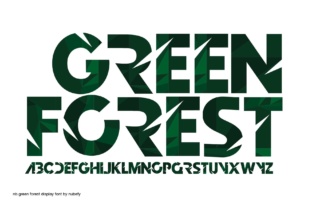
When you're working on a project that needs to pop off the screen or page, standard single-color typefaces often fall short. You need something that grabs attention immediately and communicates a specific mood without requiring extra design layers. This is where Green Forest enters the conversation. It isn't just another font file; it is a premium font designed as a color font (OpenType-SVG) that brings rich, pre-rendered hues directly into your text. By utilizing this technology, Green Forest allows you to bypass the manual process of gradient mapping or layering effects, offering a ready-made aesthetic that feels organic, lively, and modern.
The Technical Edge: Understanding Color Font Technology
For designers and creators accustomed to standard vector outlines, the shift to color font technology can be a game-changer. Traditional fonts are monochromatic vectors; you have to apply fills or gradients manually in software like PhotoShop or Illustrator to achieve depth. Green Forest, utilizing the OpenType-SVG format, stores actual bitmap or vector data within the font file itself. This means the shading, texture, and color transitions are baked right in.
It is crucial, however, to understand the compatibility landscape. This display font is fully supported in professional creative software, specifically PhotoShop, Illustrator, Silhouette, and Inkscape. This compatibility ensures that the intricate details of the color rendering remain intact. However, users should note a significant caveat regarding cutting machines: the OTF and TTF files included in this package are not compatible with Cricut. If you are a crafter relying on Cricut Design Space, the complex SVG data necessary for the color effect will not process correctly. For those using Silhouette or standard design software, the integration is seamless, provided you are comfortable with the technical requirements of modern typography.
Visual Characteristics and Style Appeal
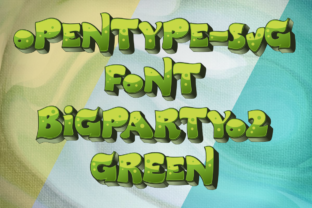
Visually, Green Forest stands out as a strong display font. It is designed to entice the reader, making it ideal for dynamic forms of communication where the text itself acts as an image. The visual weight is heavy, ensuring that it commands the stage. It creates an immediate identity or feeling—often one of nature, vitality, or bold creativity—without the need for supporting graphics. The style leans towards a modern aesthetic where the texture of the letters is just as important as the words they spell. It strikes a balance between being playful enough for hobbyists and professional enough for brand identity work.
Strategic Applications: Where Green Forest Excels
Choosing the right typeface is often about context. Green Forest is a specialized tool in your design assets library, and using it effectively means understanding where its strengths lie. Because it is a display font, it is not intended for long-form body text like novels or detailed reports. Its high visual density would fatigue the eye in small sizes. Instead, think of it as a headline driver.
In the realm of logo design, Green Forest can be incredibly effective for brands that want to project energy, eco-friendliness, or a distinct artistic flair. For packaging design, especially for artisanal goods, cosmetics, or food products, the font adds a layer of perceived value and texture that flat colors cannot match. Marketers and entrepreneurs can leverage this for social media graphics, where stopping the scroll is the primary objective. A bold, colorful headline on an Instagram story or a Facebook ad draws the eye significantly faster than a standard sans serif font.
Editorial and Digital Use Cases
Publishers and bloggers can utilize Green Forest for magazine covers, article headers, or pull quotes. In editorial design, the contrast between a colorful, textured header and a clean, readable body text (perhaps a neutral serif font or sans serif font) creates a sophisticated visual hierarchy. For web design, it serves well for hero section titles or call-to-action buttons where you want to inject personality immediately. However, web designers must ensure the file size is optimized, as color fonts can be heavier than standard vector fonts.
Enhancing Brand Perception and Engagement
Typography is silent communication. The choice of Green Forest signals specific traits about a brand. It suggests that the brand is modern, unafraid of bold choices, and detail-oriented. Using a creative font like this helps build recognition. When a small business owner consistently uses a distinctive font like Green Forest across their headers and promotional materials, it becomes a mnemonic device for the audience.
This font influences readability in the sense that it makes text impossible to ignore. While it simplifies the reading of long paragraphs (which it shouldn't be used for), it maximizes the impact of short, punchy statements. It aids in establishing a professional look that feels curated rather than generic. By integrating Green Forest into your brand identity, you move away from the "default" look of Canva or Word templates and into a space of custom design.
Practical Guidance for Implementation
If you are considering adding Green Forest to your toolkit, practical evaluation is key. Content creators and crafters should test the font immediately in their specific environment. Download the files and open them in your primary software—whether that is Illustrator for vector work or Silhouette for crafting projects.
One of the most critical aspects of working with a display font is font pairing. Because Green Forest has such a strong personality, it requires a quiet partner. Do not pair it with another decorative, handwritten font, or script font; the result will be chaotic. Instead, look for a neutral, geometric sans serif font for subtitles and a highly legible serif font for body copy. This contrast allows Green Forest to shine as the protagonist of the design without overwhelming the viewer.
Before finalizing a project, review the included styles. Ensure the character set supports the specific language or symbols you need. While the visual appeal is the main draw, the utility of the font determines its long-term value. For commercial font usage, always double-check the licensing terms. Most premium licenses cover standard commercial use, such as selling physical products (t-shirts, mugs) or digital assets, but terms can vary. Ensure your usage aligns with the license to avoid legal complications down the road.
Ultimately, Green Forest is more than just a file; it is a statement piece. For the designer, marketer, or hobbyist